mortred_model_server

Mortred is a Linux process-per-model CV inference appliance: one catalog id is one OS process. Clients talk to mortred-gateway (:8080); the supervisor (:8787) owns the process tree. Inference backends are MNN, ONNX Runtime, and TensorRT, served over workflow. Weights are trained elsewhere (tensorflow / pytorch).
Do not hesitate to let me know if you find bugs here cause I’m a c-with-struct noob :upside_down_face:
The three major components are illustrated on the architecture picture below.
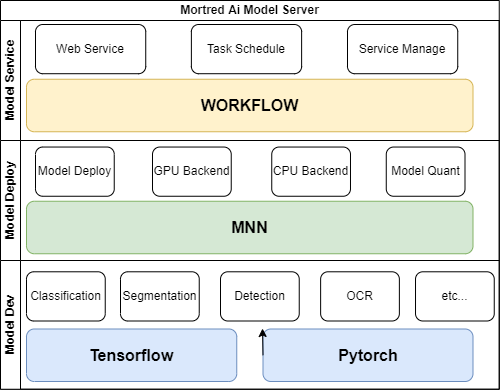
A quick overview and examples for both serving and model benchmarking are provided below. Detailed documentation and examples will be provided in the docs folder.
You’re welcomed to ask questions and help me to make it better!
Weights: python3 scripts/fetch_weights.py from
Hugging Face.
HF is the ONNX interchange store (some .mnn copies remain during cutover).
Product configs stay mnn / tensorrt except already-ONNX ids and LIBFACE
(YuNet); build engines on this GPU with mortredctl prepare. Per-id contract:
conf/onnx_sources.json. Dual-file export: docs/onnx-interchange.md.
Contents of this document
- Quick Start
- Benchmark
- Tutorials
- How To
- Web Server Configuration
- HTTP API Contract
- Long-task
/jobscustomer test - Model Zoo
Quick Start
First-hour path: pick an install entry below, then run mortredctl next
repeatedly (tokens → loopback listen → start → GPU pack calibrate if needed →
doctor --strict). Full walkthrough: docs/deployment.md.
Out of scope: unsupported boundaries.
Linux is the only supported platform. Two deployment profiles exist and one switch drives everything (build, dependencies, model catalog, weight subset):
gpu(default)cpubackends MNN-CUDA / ORT-CUDA / TensorRT MNN-CPU / ORT-CPU hardware NVIDIA GPU + CUDA 12 / TensorRT 10 any x64 machine models full zoo curated set (mobilenetv2, resnet50) Three entries, one core (
mortredctl): pick whichever fits; they all end at the samemortredctl doctoracceptance gate.
Entry 1: one-line bootstrap (fastest)
curl -fsSL https://raw.githubusercontent.com/MaybeShewill-CV/mortred_model_server/main/scripts/bootstrap.sh | bash
Detects your hardware (NVIDIA GPU → gpu, otherwise cpu). With Docker it
prints the compose track. Without Docker it resolves the latest GitHub
release tag and downloads
mortred_model_server-<version>-<profile>-linux-x64.tar.gz (there is no
...-latest-... tarball filename). If no Release exists yet, it warns and
prints the source-build path.
Entry 2: docker compose
git clone https://github.com/MaybeShewill-CV/mortred_model_server.git
cd mortred_model_server
python3 scripts/fetch_weights.py --profile cpu        # or: gpu
./scripts/mortredctl_init-trust.sh                    # three distinct tokens
set -a && . conf/local/trust.env && set +a
docker compose --profile cpu up -d                    # or: --profile gpu
curl -fs http://localhost:8787/api/v1/health
Entry 3: release tarball + systemd (bare metal)
Download mortred_model_server-<version>-<profile>-linux-x64.tar.gz from
Releases,
verify its .sha256, then:
mkdir unpack && tar -xzf mortred_model_server-*-linux-x64.tar.gz -C unpack
cd unpack                                          # archive is flat: install.sh, opt/, deploy/
sudo ./install.sh                                  # runtime deps + /opt/mortred + systemd
# install.sh writes a comment-only placeholder; --force fills real secrets
sudo /opt/mortred/bin/mortredctl.out init-trust --force --out /etc/mortred/supervisor.env
cd /opt/mortred && python3 scripts/fetch_weights.py --profile cpu
sudo systemctl start mortred-supervisor
First-hour core: mortredctl
mortredctl next                       # ONE next OOB command (see docs/deployment.md)
mortredctl init [--profile cpu|gpu]   # detect hw, fetch weight subset, verify
mortredctl init-trust                 # write conf/local/trust.env (gitignored)
mortredctl init-edge --mode lan       # optional Nginx TLS on the host network
mortredctl prepare [--pack FILE]      # GPU: pack TensorRT engines on this card
mortredctl calibrate [--pack FILE]    # worker_nums report; --write-pack is opt-in
mortredctl doctor                     # live acceptance + non-fatal security warnings
mortredctl doctor --strict            # engines, occupancy stamps, and security warnings fail the gate
mortredctl status | catalog           # runtime introspection
After cmake --build --preset full, the control binary is
_bin/mortredctl.out (not mortredctl on PATH). Source-tree start:
export PATH="$PWD/_bin:$PATH"
export LD_LIBRARY_PATH="$PWD/_lib:$PWD/3rd_party/libs:${LD_LIBRARY_PATH:-}"
mortredctl next
WSL2 Ubuntu and native Ubuntu use these same commands. On WSL2, libcuda
comes from /usr/lib/wsl/lib via LD_LIBRARY_PATH when the loader does not
find it on its own. Do not use a second CUDA code path.
Building from source
Cpu source build: install_deps.sh --cpu --all && --cpu --check, then
cmake --preset full-cpu (details: docs/deployment.md §7).
# dependencies (version matrix + sha256 pinned + idempotent stamps)
./scripts/install_deps.sh --all              # gpu line (CUDA 12 / TensorRT 10.3)
./scripts/install_deps.sh --cpu --all        # cpu line (no NVIDIA/TRT at all)
./scripts/install_deps.sh --check            # gpu: verify 3rd_party before cmake
./scripts/install_deps.sh --cpu --check      # cpu: same

# configure + build (presets carry the profile). Configure is fail-closed on
# missing workflow/crypto, wrong ORT headers (ORT_API_VERSION), leftover ORT 1.18 /
# TRT 8 — stderr prints the matching install_deps fix line.
cmake --preset full && cmake --build --preset full            # gpu
cmake --preset full-cpu && cmake --build --preset full-cpu    # cpu

# verify
./scripts/verify_deployment.sh --basic
Unit tests only (no engines needed; apt system packages plus the vendored
header-only libs — note libssl-dev is required for the API-key hashing path,
and 3rd_party/ is generated by install_deps.sh, never tracked in git):
./scripts/install_deps.sh --headers
cmake --preset tests-only && cmake --build --preset tests-only
# buildPreset default target is `check` (EXCLUDE_FROM_ALL tests + ctest)
The complete operations manual - architecture diagrams, per-track walkthroughs, security checklist, upgrades, troubleshooting - lives in docs/deployment.md / 中文版.
Benchmark
The benchmark test environment is as follows:
OS: Ubuntu 20.04.5 LTS / 5.15.0-87-generic
MEMORY: 32G DIMM DDR4 Synchronous 2666 MHz
CPU: Intel(R) Core(TM) i5-10400 CPU @ 2.90GHz
GCC: gcc (Ubuntu 9.4.0-1ubuntu1~20.04.2) 9.4.0
GPU: GeForce RTX 3080
CUDA: CUDA Version: 11.5
GPU Driver: Driver Version: 495.29.05
Model Inference Benchmark
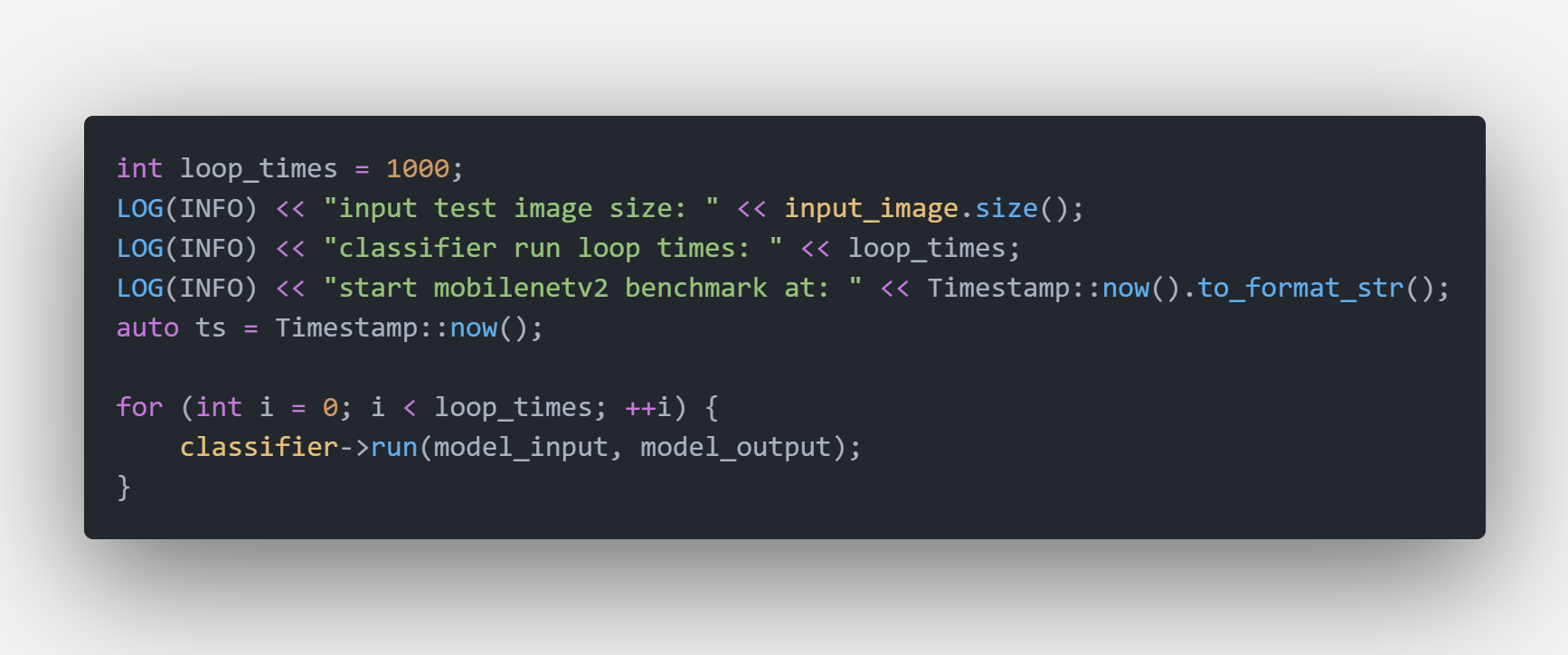
All models loop several times to avoid the influence of gpu’s warmup and only model’s inference time has been counted.
Benchmark Code Snappit
Tutorials
How To
- Model Developer Guide (add model / contract / golden / debug) :fire::fire:
- How To Add New Server :fire::fire:
- Inference CI (hosted MNN smoke vs maintainer GPU golden)
- ONNX interchange export (dual files, remaining gaps)
Model Zoo
HTTP-served (mortred-model-server.out --list / catalog id):
HTTP catalog ids are lowercase. Old names such as YOLOV8 and PPHUMAN_SEG are gone; use /v1/models/yolov8s/infer. One weight file is one id. msocrnet is HTTP. SAM_AMG and the diffusion ids stay as they are.
| Task | Catalog id |
|---|---|
| Classification | mobilenetv2 resnet densenet |
| Detection | yolov5l yolov6s yolov7 yolov7x yolov8n yolov8s yolov8l yolov8x nanodet_1x5 nanodet_416 |
| Face | libface centerface |
| OCR | dbnet |
| Segmentation | bisenetv2 pphuman_mobile pphuman_lite pphuman_server hrnet msocrnet |
| Matting | modnet ppmatting_512 ppmatting_1024 ppmatting_resnet34 ppmatting_v2 |
| Enhancement | enlightengan attentive_gan realesrgan |
| Feature points | superpoint |
| Embedding | dinov2_vits14 dinov2_vitb14 dinov2_vitl14 |
| Depth | depth_vits14 depth_vitb14 depth_vitl14 metric3d_512 metric3d_1088 |
| SAM | SAM_AMG |
| Diffusion | DDPM DDIM CLS_COND_DDIM LDM |
Bench-only (no HTTP catalog): OPENAI_CLIP, LIGHTGLUE, SAM_PREDICTOR, FAST_SAM.
Scaffold / not served: RTDETR. There is no MOT.
Product ONNX fetch, then a machine pack, then prepare and calibrate:
python3 scripts/fetch_weights.py --kind onnx
cp conf/packs/yolov8.toml /tmp/pack.toml
mortredctl prepare --pack /tmp/pack.toml
mortredctl calibrate --pack /tmp/pack.toml --write-pack
python3 scripts/server/http_infer_rps.py --model yolov8s -c 8 -d 30s --raw
Unsupported boundaries (Linux-only, RTDETR scaffold, TensorRT 10.x only, engines must rebuild on this GPU): docs/unsupported-boundaries.md / 中文摘要.
Web Server Configuration
- Description About Model Server
- HTTP API Contract (topology, auth, status mapping, overload behaviour)
Deployment
One-command dependency install
Build and install all third-party dependencies (MNN / WORKFLOW / ONNXRUNTIME /
TensorRT / CUDA / fmt / header-only libs) into 3rd_party/{include,libs} with
a single script — no manual compilation or copying:
./scripts/install_deps.sh --all     # CUDA 12 / TensorRT 10.3 / MNN 3.6.1 / ORT 1.29 cuda12
./scripts/install_deps.sh --check   # verify integrity and print versions
Docker (fully automated build)
docker build -t mortred_model_server:gpu .
docker run --gpus all -p 127.0.0.1:8080:8080 -p 127.0.0.1:8787:8787 \
  -v $PWD/weights:/opt/mortred/weights \
  -e MORTRED_GATEWAY_AUTH_TOKEN=your-inference-token \
  -e MORTRED_API_TOKEN=your-management-token \
  -e MORTRED_METRICS_TOKEN=your-scrape-token \
  mortred_model_server:gpu
# or: docker compose --profile gpu up -d   (CPU: --profile cpu; see docker-compose.yml)
The image builds all deps + the full project, runs the unit/e2e tests, and
ships the control plane. In-container topology: mortred-supervisor
(management :8787, embedded web UI + REST API) supervises mortred-gateway
(data plane :8080, the single inference entry) and all model servers; model
processes bind loopback only and are no longer exposed port by port. The
compose and docker run examples bind 8080/8787 to 127.0.0.1 on the host.
External exposure must terminate TLS at Nginx on the host network
(mortredctl init-edge, deploy/nginx); do not publish
those ports on 0.0.0.0 without it (Bearer tokens would travel in the
clear). Gateway GET /metrics always requires MORTRED_METRICS_TOKEN,
including on loopback. Fail-closed also refuses a listener with no
inference/management auth, a missing scrape token, a scrape token that
matches those, and a wildcard bind unless MORTRED_EXPOSE=docker (containers)
or unsafe (plaintext on metal). mortredctl doctor warns about non-loopback
listeners, missing scrape token, and weak/identical tokens; doctor --strict
fails on those warnings. TLS stays at Nginx.
TensorRT engine regeneration (hardware-adapted)
Engines are bound to this GPU / TensorRT. Day-to-day, convert the current pack (deployment guide §10):
mortredctl prepare --pack conf/packs/yolov8.toml
Zoo-wide convert remains scripts/convert_trt_engines.sh (trtexec via
sudo ./scripts/install_deps.sh --nvidia). MORTRED_AUTO_BUILD_ENGINES=true
converts every engine and stays off by default.
TODO
- Add more model into model zoo
Repo-Status
Star History
Visitor Count

Acknowledgement
mortred_model_server refers to the following projects: